LinkUp
A mobile app for efficient meetup planning through AI powered calendar synchronization, designed to simplify coordination and decision making.
Categoty
B2C, Mobile Design
Role
UI Design, UX Research, UX Writing, Prodoct Managment
Tools
Figma, Miro, AI Tools
.png)
The Problem
Coordinating group schedules is frustrating and time-consuming. Messages get lost, plans are delayed, and conflicting calendars create constant stress.
The Goal
The goal is to create a simple, friendly way to schedule group meetups. It gives everyone a clear view of each other’s availability and reduces endless messaging. A single, accessible space that makes planning fast and effortless.
The Task
Making event planning, availability sharing, and group scheduling tasks easily accessible and understandable to users of all ages, while keeping the process light, simple, and fast.

Competitors

Common Strengths
-
Easy scheduling and calendar integration.
-
Automated reminders and confirmations.
-
Professional, user-friendly interfaces.
-
Support for multiple participants and time zones.
Common Weaknesses
-
Focused mainly on work or formal meetings.
-
Limited personalization or casual use cases.
-
Rigid flows that feel “tool-like” rather than social.
-
No shared group experience or emotional engagement.
User Research
To better understand the pain points and needs of real users, I conducted 5 in-depth interviews. Participants included students, parents, and professionals.
Interview Goals
-
Understand current scheduling habits.
-
Identify friction points in current tools.
-
Gather emotional responses to planning.
-
Uncover motivation to use a new app.
“If someone can’t make it, then more people can’t, and then we’re stuck- It’s just a hassle.”
“Always trying to set a time on WhatsApp, even opening a group so it's more organized, and still in most of the times we fail to find a time that works.”
“Group chats get messy and everyone’s schedules just clash. We need one place that does it all.”
Main Insights
People need to see everyone’s availability clearly and in one place.
Users want less “What about this time?” messages.
Smart suggestions build confidence.
The ideal tool “just works” with little setup.
User Flow


Wireframes


Design Solutions

Minimal Input Flow
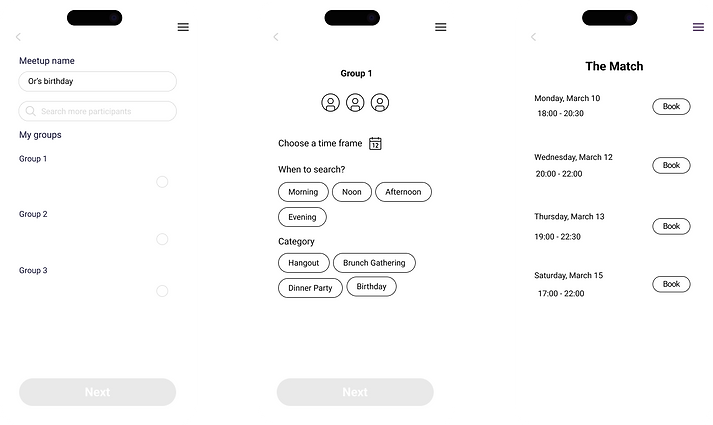
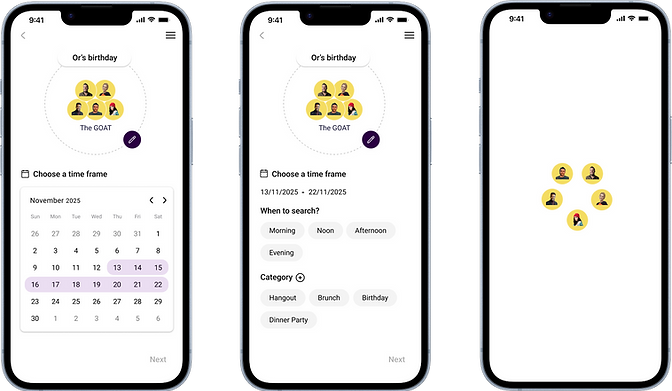
The creation process is streamlined into a few steps, minimizing manual searching and communication errors.
Visual Group Representation
Participant avatars are consistently used in the creation and results flow, visually reinforcing the communal aspect and "shared group experience."
Mobile-First Design
The layout is optimized for quick, on-the-go scheduling, fitting the user scenario of coordinating informal social meetings.
Prototype


Screens



Project Summary
LinkUp is a scalable product concept designed to reduce friction in group scheduling through smart calendar synchronization and clear availability visualization.
If launched, success would be reflected in:
-
high event creation and onboarding completion.
-
reduced time to schedule group meetups.
-
strong repeat usage within friend and family groups.
-
high trust and adoption of smart scheduling suggestions.
Together, these KPIs would indicate strong product value, product-market fit, and clear business viability.